Wholesale Cactus Batch Photo Checklist: Approve Your Selection
Review wholesale cactus batch photos with tray overviews, ruler views, root evidence and item codes. Record clear selection approval before packing from China.
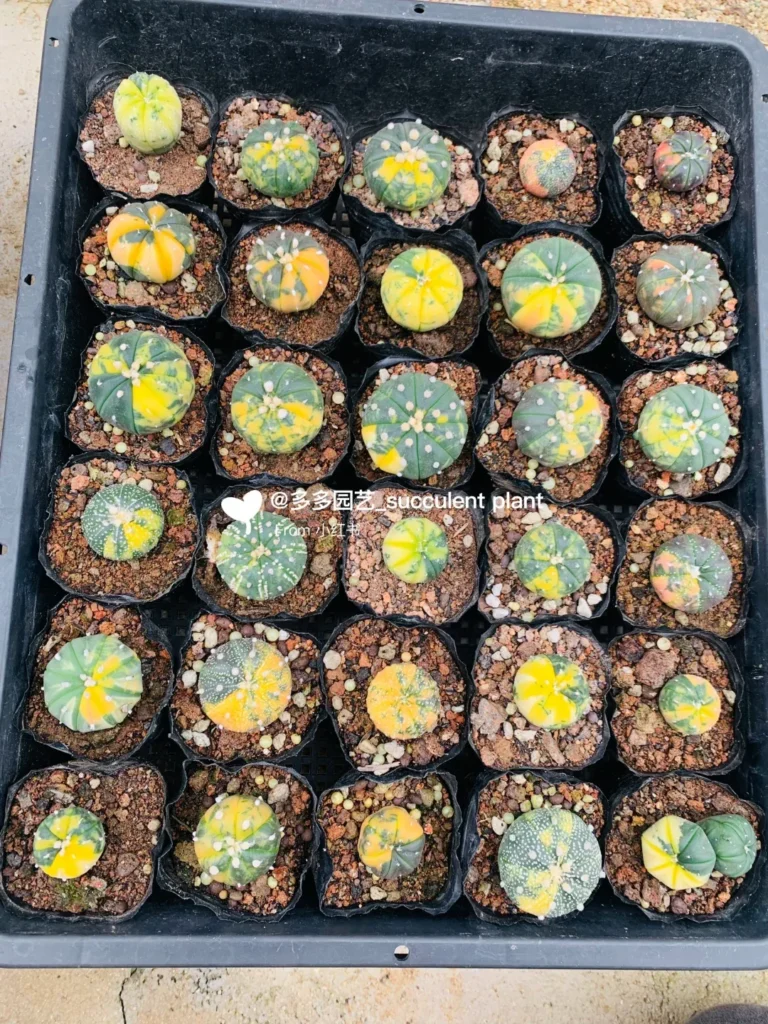
A wholesale cactus batch photo checklist helps a buyer answer one practical question: do the photographs document the plants described in the quotation? A beautiful close-up may show a desirable form, but it cannot explain the size distribution, quantity or selection method of an entire order.
Use this guide before approving a proposed batch or paying against an agreed selection. It covers photographic evidence and the approval record. For the later dispatch stage, use the separate cactus packing checklist; for arrival, use the shipment receiving checklist.
Start with an order-line photo register
Assign each buying line an item code, botanical label, plant form, measurement band and quantity. Ask the supplier to place the relevant code beside the plants in an overview photograph. A mixed bench without labels is useful context, but it is difficult to connect to a specific invoice line.
Distinguish catalogue reference images, sample-grade photographs and photographs of the proposed sale batch. Record the photograph date and the selection stage. If plants have not yet been selected, ask what the images represent and when the final selection evidence will be supplied.
Use a simple register with file name, order line, view type, date, reviewer and status. A file name such as “line-03-tray-A-overview” is easier to retrieve than an unexplained messaging-app image. Preserve the original files and keep any approval comments beside the correct version.
Request a sequence from overview to detail
Begin with complete trays or clearly bounded groups. Then request ordinary examples, size-limit examples and close views of the features that determine your grade. This sequence helps you connect attractive individual plants to the wider assortment.
| Photo | What it should show | Buyer check |
|---|---|---|
| Batch overview | Complete tray or marked group with an item code | Does it relate to the quoted line and quantity? |
| Representative examples | Ordinary plants from different parts of the batch | Is the range of appearance visible? |
| Size limits | Smallest and largest accepted examples beside a ruler | Are the measurement rules consistent? |
| Top and side views | Body shape, height, growing point and spine presentation | Is a missing angle concealing an unanswered question? |
| Root or graft details | The relevant format and union where applicable | Does it support the agreed root-condition description? |
| Marks and exceptions | Close views of scars, broken spines or other disclosed variation | Are these within the agreed appearance standard? |
Ask for images clear enough to inspect the plant, label and ruler without strong color filters or excessive compression. Natural differences in lighting can affect apparent color; request a consistent view when color presentation matters to the order.
Agree on selection evidence instead of requesting highlights
Decide whether you are buying individually approved plants or a batch chosen within a grade. For individual selection, code every approved plant and keep its photographs with the order. For a graded batch, agree on how the photographed examples will be chosen.
A practical request is to show ordinary examples from the front, center and back of each tray, plus the lower and upper size limits. The purpose is to expose variation, not to claim statistical certainty. The number and method of checks should reflect the batch’s variety, value and the consequences of a mismatch.
For a high-value or visibly variable batch, request more individual evidence or discuss an independent inspection. A short continuous video can help connect rows and labels, but it does not replace clear still photographs for measurements and the approval record.
Check how the ruler is being used
Ask for the plant body and ruler in the same plane where practical. A ruler nearer the camera can make a plant look misleadingly small, while an angled image may obscure the widest point. Request a second view if the measuring point is unclear.
For globular cacti, define body diameter excluding projecting spines, flowers and the pot. Add height, clump footprint or head-count range when those features affect the grade. For grafted plants, keep scion dimensions separate from total plant height and rootstock dimensions.
Genus-specific expectations differ. The Mammillaria guide explains clump footprints and head counts; the Astrophytum guide explains appearance and plant-history questions. Apply the measurement rules agreed for the line rather than a single pot-size rule across all selections.
Connect root and graft photographs to the right plants
Request root evidence appropriate to the format being offered. If plants will be prepared bare root, agree when roots can be photographed during preparation. For potted material, discuss a proportionate checking method with the supplier; do not request unnecessary disturbance merely to create a photo set.
For grafted material, request readable rootstock information and views of the graft union. For recently degrafted or unrooted material, keep that condition explicit in the order record. A root photograph from a different plant or an earlier batch does not document every plant in the proposed order.
Photographs support purchasing decisions, but they cannot establish the absence of hidden pests or every aspect of plant health. They also do not replace applicable shipment documents or official inspections. Use the official APHIS import guidance to check the actual commodity, origin and shipment form for a U.S. order.
Give each order line an explicit review result
Use three straightforward statuses: approved against the stated specification, more evidence required, or replacement requested. Do not approve an entire order if one line still has an unresolved measurement or identity question.
- Match the overview to the botanical label, item code and quantity.
- Compare the ordinary examples and size limits with your grade.
- Record accepted cosmetic variation and any excluded plants.
- List missing views or unanswered root-format questions.
- Save the approved photo version and specification together.
- State which changes require a fresh approval before packing.
For example, “Line 02 needs a side view and a ruler photo of the smallest accepted plant” is easier to act on than “please send better photos.” Link the request to an observable issue and keep the reply with that order line.
Carry the approval record into packing and receiving
Once the selection is approved, send the same item codes and accepted measurements to the packing and receiving teams. Keep approval photographs separate from later carton and dispatch photographs so each record’s purpose remains clear.
If the proposed selection changes, ask for updated evidence before accepting the change. Also align the approved grade with the costs in the quotation comparison sheet. A price comparison is meaningful only when it refers to the same plant specification and delivery scope.
Send a focused batch-photo request
Please send dated photos linked to each line of my cactus buying list: a complete tray overview with item codes, ordinary examples from different positions, smallest and largest accepted plants beside a ruler, top and side views, and relevant root or graft details. Please identify whether each photo shows a reference grade or the proposed order selection, and flag variations requiring my approval.
Start with the plant catalogue, add names or item codes, dimensions, quantities and your destination, then send a wholesale inquiry. A precise evidence request makes remote batch review easier to complete.
Frequently asked questions
Are three attractive close-ups enough for a wholesale batch?
They may leave the distribution and quantity unclear. Request an overview, ordinary examples and size limits linked to the quoted line.
Can a video replace measurement photographs?
A video can show continuity across a tray. Keep clear still images for ruler measurements, labels and written approval references.
Should I approve a batch from a catalogue image?
Use a catalogue image to communicate the intended selection. Request evidence of the proposed batch and agree on its grade before approving that order line.